DNAUpdater — MetaHuman DNA Update Tool for UE5.8
1. Background
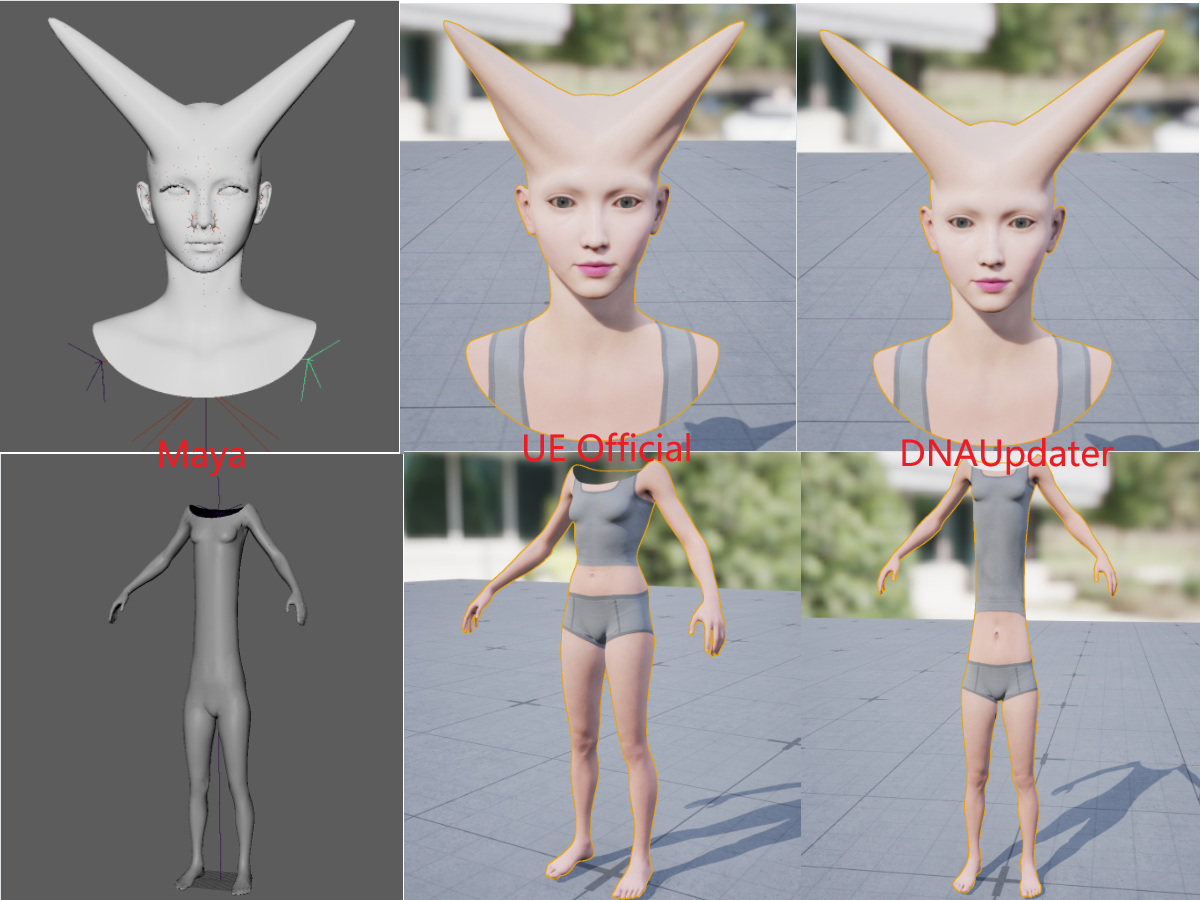
UE5.8's built-in DNA import only creates a UDNA asset for RigLogic runtime evaluation — it does not update the skeletal mesh's Reference Pose, vertex positions, skin weights, or Morph Targets.
This means: if you modify a MetaHuman's body proportions or joint positions in Maya, export a new DNA file, and reimport it in UE, nothing changes on the mesh.
DNAUpdater fixes this. It reads everything from the DNA file — vertices, skin weights, BlendShapes, joints — and applies it all to your selected SkeletalMesh in one click.
2. Usage
In the Content Browser, right-click any SkeletalMesh (MetaHuman body or head) and navigate to Metahuman Updater:
2.1 Update mesh with DNA file

Figure 1. Update mesh with DNA file in the Content Browser.
This is the main feature. Select a .dna file and the plugin automatically:
- Updates neutral-pose vertex positions
- Updates all Morph Targets (BlendShapes)
- Updates skin weights
- Updates skeleton (root joint is skipped automatically, to avoid coordinate system artifacts)
- Creates/updates the
UDNAasset for RigLogic compatibility
One click. Head and body, all at once.
2.2 Add a blendshape
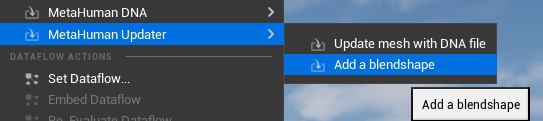
Figure 2. Add blendshape for SkeletalMesh.
Add a new Morph Target from an OBJ file. OBJ is expected in Maya coordinate space (Y-up); the plugin converts to UE space automatically.
Use case: sculpted a new facial expression in Maya, export as OBJ, add it to the existing mesh.
3. Notes
- MetaHuman DNA files only
- Editor-only (not packaged at runtime)
4. Typical Workflow
Modify MetaHuman in Maya (shape, skeleton, expressions)
       ↓
Export new .dna file
       ↓
UE5.8 Content Browser → Right-click SkeletalMesh → Metahuman Updater → Update mesh with DNA file
       ↓
Choose .dna file → Done
       ↓
Save asset. RigLogic animations adapt to the updated mesh automatically.
1. 背景
UE5.8 中,MetaHuman 的 DNA 文件导入后,官方流程只负责创建 UDNA 资产供 RigLogic 运行时使用——它不会更新骨骼的 Reference Pose,也不会把 DNA 里的顶点数据、蒙皮权重、Morph Target 写入网格。
这意味着:如果你在 Maya 中修改了 MetaHuman 的身体比例或骨骼位置,导出 DNA 后在 UE 中重新导入,模型不会发生变化。
DNAUpdater 就是解决这个问题的。它把 DNA 文件里的所有数据——顶点、蒙皮、BlendShape、骨骼——一键更新到你选中的 SkeletalMesh 上,让 Maya 中的修改真正反映到 UE 里。
2. 使用
在 Content Browser 中,右键点击任意 SkeletalMesh 资产(MetaHuman 身体或头部),找到 Metahuman Updater 子菜单:
2.1 Update mesh with DNA file
Figure 1. Update mesh with DNA file in the Content Browser.
这是核心功能。 选一个 .dna 文件,插件自动完成:
- 更新网格顶点位置(中性姿态)
- 更新所有 Morph Target(融合变形)
- 更新蒙皮权重
- 更新骨骼信息(根关节自动跳过,避免坐标系伪影)
- 创建/更新
UDNA资产,确保 RigLogic 运行时正确
一句话:DNA 里有什么,就更新什么。头身通用,无需区分。
2.2 Add a blendshape
Figure 2. Add blendshape for SkeletalMesh.
适用场景:在 Maya 中雕刻了一个新的面部表情,导出 OBJ,添加一个新的 Morph Target到已有网格上。
3. 注意事项
- 仅适用于 MetaHuman 管线生成的 DNA 文件
- 仅编辑器可用,不会打包到运行时
4. 典型工作流
Maya 中修改 MetaHuman(体型、骨骼、表情)
       ↓
导出新的 .dna 文件
       ↓
UE5.8 Content Browser → 右键 SkeletalMesh → Metahuman Updater → Update mesh with DNA file
       ↓
选择 .dna 文件 → 完成
       ↓
保存资产,RigLogic 动画自动适配新网格
5. Additional Tool — DNAUpdater.exe (PyQt5 Standalone)
In addition to the UE5 Editor plugin, a standalone PyQt5 desktop tool is also provided for DNA file operations outside the engine — modifying DNA internal meshes (base mesh, BlendShape meshes), full-body sculpting workflow merge & restore, DNA inspection, JSON round-trip, and OBJ extraction.
5.1 Download
Download the standalone tool here:
DNAUpdater.exe
Dependencies: Python 3.14.6, PyQt5, OpenRigLogic v13.2.7, NumPy, SciPy.
5.2 UI Layout
┌──────────────────────────────────────────────────┐
│ Head DNA: [path]                 [Choose...] ┌──┐│
│ Body DNA: [path]                 [Choose...] │EN││
│ Output path: [D:/]                           └──┘│
├──────────────────────────────────────────────────┤
│ PART1 : Modify DNA (BaseMesh / BlendShape)       │
│ PART2 : Full Body (Merge / Restore)              │
│ PART3 : DNA Inspector & Tools                    │
│   [Load Info] [Validate] [Export JSON] ...       │
└──────────────────────────────────────────────────┘
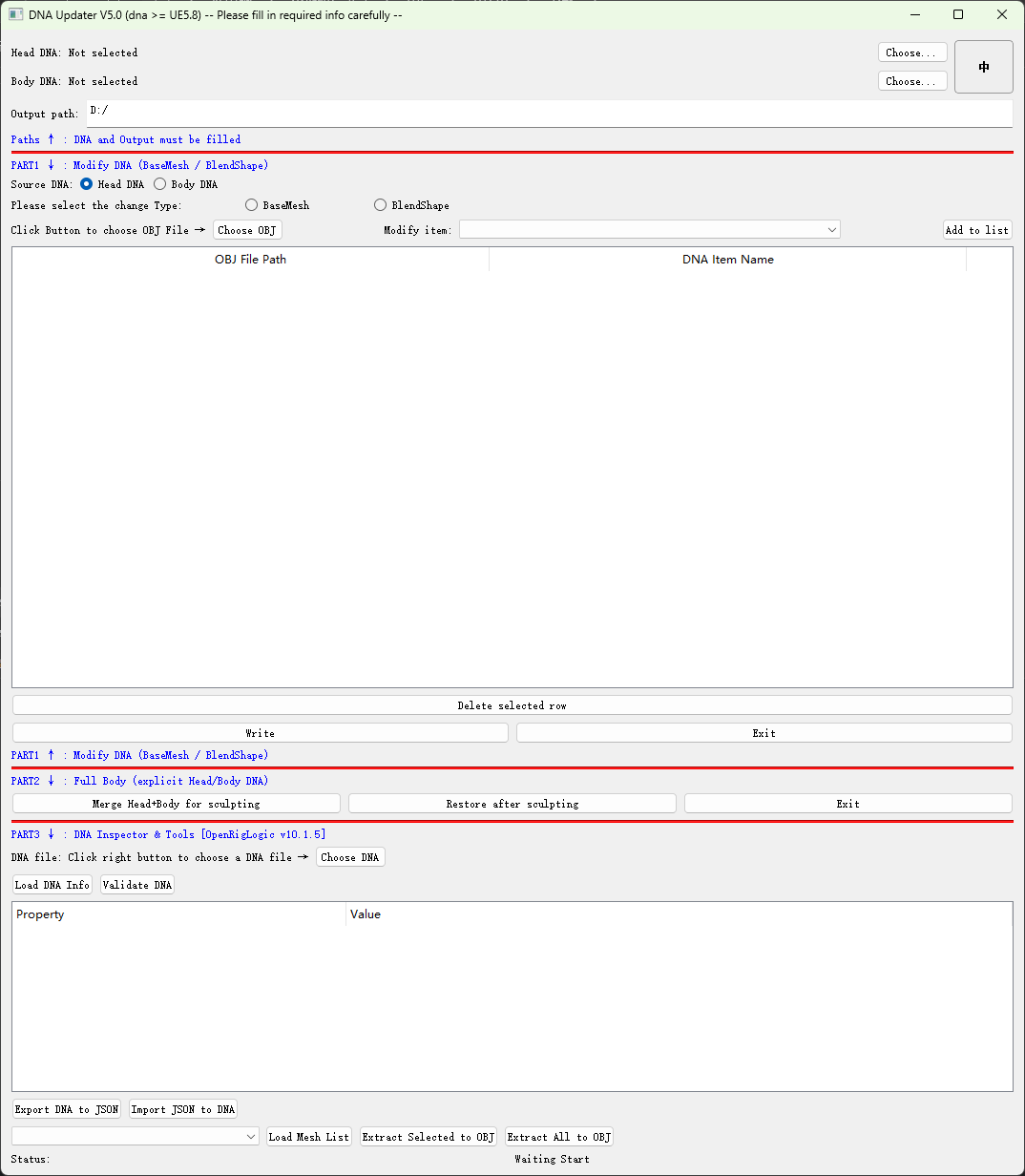
Figure 3. DNAUpdater.exe UI preview.
Click the 中 / EN button at the top-right to toggle between English and Chinese.
5.3 Part 1 — Modify DNA (BaseMesh / BlendShape)
Write sculpted OBJ meshes back into a DNA file. Supports both BaseMesh and BlendShape modifications, batchable via a task list.
- Select Head DNA at the top
- Set Output path
- Choose BaseMesh or BlendShape
- Click Choose OBJ and select the sculpted file
- Pick the target name from the dropdown
- Click Add to list
- Click Write → outputs
modified_<name>.dna
Note: OBJ vertex count must match the target mesh in the DNA file.
5.4 Part 2 — Full Body (Merge / Restore)
Merge: Combines head mesh (from Head DNA) and body mesh (from Body DNA) into a single full-body OBJ for sculpting in external 3D software.
Restore: Takes the sculpted full-body OBJ, splits it back into head and body components, and writes both back into separate DNA files.
Restore outputs 4 files:
Restored_Head_<name>.dnaRestored_Body_<name>.dnaRestored_Head.objRestored_Body.obj
5.5 Part 3 — DNA Inspector & Tools
DNA Info: Load a DNA file and inspect its full structure — descriptor, meshes (vertex/face counts), BlendShape channels (delta counts), joint hierarchy, metadata, and validation status — all in an expandable tree view.
DNA ↔ JSON:
- Export DNA to JSON — complete round-trip-safe JSON export including all geometry and behavior data. Uses compact flat arrays for manageable file size.
- Import JSON to DNA — reconstruct a DNA file from JSON.
DNA → OBJ: Extract individual or all meshes from a DNA file as OBJ files (vertices, UVs, normals, faces) for use in external 3D software.
5. 附加工具 — DNAUpdater.exe(PyQt5 独立桌面版)
除了 UE5 编辑器插件,还提供了一个 独立的 PyQt5 桌面工具,用于在引擎外部操作 DNA 文件——包括 修改DNAn内部网格体(基础网格体,表情网格体)、全身雕刻工作流的合并与还原、DNA 信息查看、JSON 往返转换、OBJ 网格提取。
5.1 下载
在此下载独立工具:
DNAUpdater.exe
依赖: Python 3.14.6, PyQt5, OpenRigLogic v13.2.7, NumPy, SciPy。
5.2 界面布局
┌──────────────────────────────────────────────────┐
│ Head DNA: [path]                 [Choose...] ┌──┐│
│ Body DNA: [path]                 [Choose...] │中││
│ Output path: [D:/]                           └──┘│
├──────────────────────────────────────────────────┤
│ PART1 : 修改 DNA (基础网格 / 变形目标)             │
│ PART2 : 全身处理 (合并 / 还原)                     │
│ PART3 : DNA 检查器 & 工具                         │
│   [加载信息] [验证] [导出JSON] ...                 │
└──────────────────────────────────────────────────┘
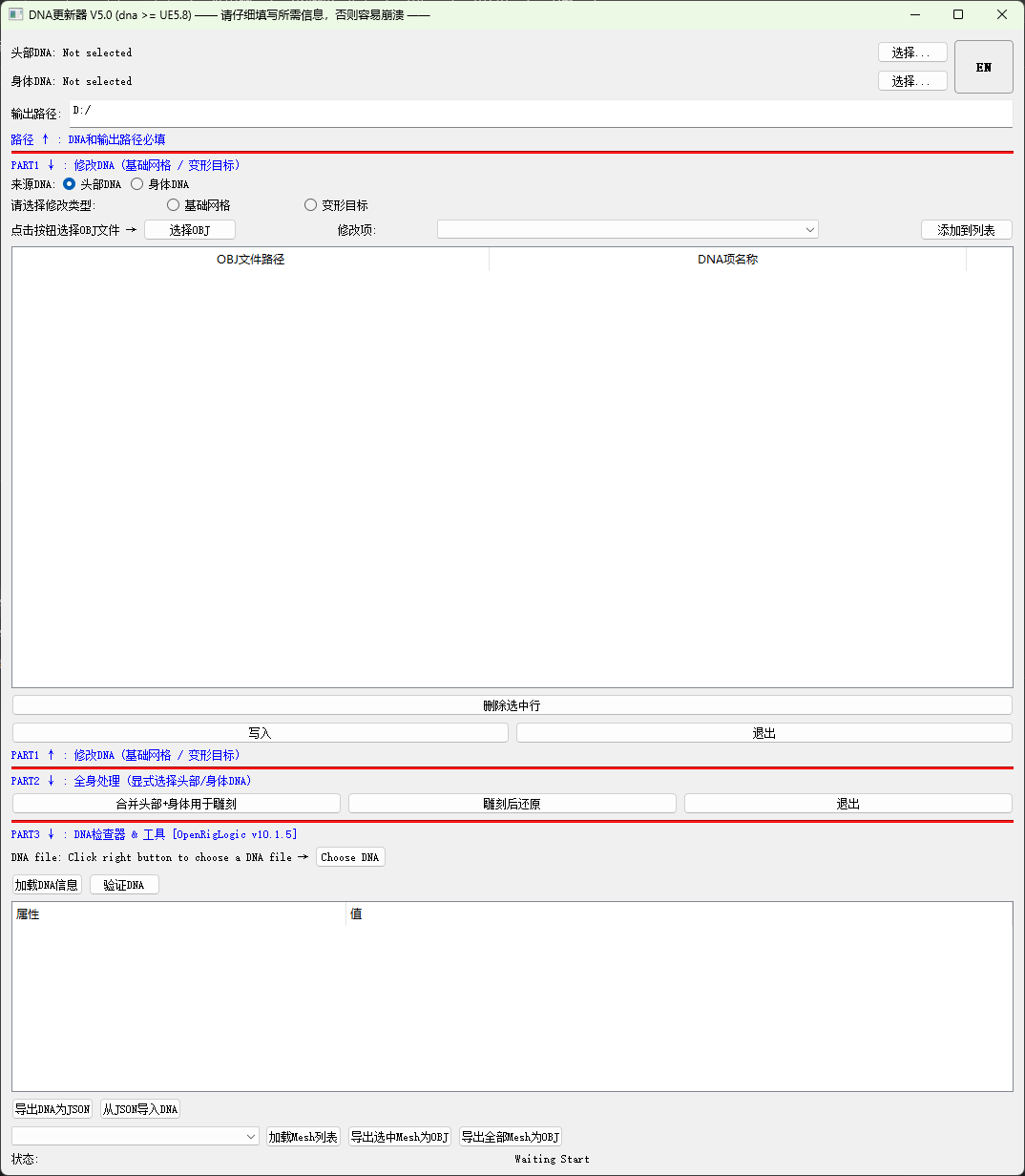
Figure 3. DNAUpdater.exe UI preview.
右上角的 中 / EN 按钮可随时切换界面语言。
5.3 Part 1 — 修改 DNA(BaseMesh / BlendShape)
将雕刻后的 OBJ 网格数据写回 DNA 文件。支持基础网格和变形目标的批量修改。
- 顶部选择 Head DNA 文件
- 设置 输出路径
- 选择 BaseMesh 或 BlendShape
- 点击 Choose OBJ 选择雕刻后的文件
- 从下拉框中选择目标名称
- 点击 Add to list
- 点击 Write → 输出
modified_<名称>.dna
注意: OBJ 顶点数必须与 DNA 中目标 mesh 的顶点数一致。
5.4 Part 2 — 全身处理(Merge / Restore)
合并(Merge): 将头部 DNA 的头部网格与身体 DNA 的身体网格合并为单个全身 OBJ,方便在 Maya/Blender 中统一雕刻。
还原(Restore): 将雕刻后的全身 OBJ 拆分回头部和身体,分别写回独立的 DNA 文件和 OBJ 文件。
还原输出 4 个文件:
Restored_Head_<名称>.dnaRestored_Body_<名称>.dnaRestored_Head.objRestored_Body.obj
5.5 Part 3 — DNA 检查器 & 工具
DNA 信息查看: 加载 DNA 文件后以树形结构展示完整信息——描述符、Mesh(顶点/面数)、BlendShape 通道(delta 数量)、关节层级、元数据和验证状态。
DNA ↔ JSON:
- Export DNA to JSON — 完整导出 DNA 为 JSON(含 geometry + behavior),使用紧凑 flat array 格式控制文件大小,支持完整往返还原。
- Import JSON to DNA — 从 JSON 文件重建 DNA。
DNA → OBJ: 从 DNA 中提取指定或全部 mesh 为 OBJ 文件(含顶点、UV、法线、面),供外部 3D 软件使用。